
Autoloot

Autoloot automatically picks up the items you choose from the corpses of monsters you kill.
You can assign each item its own backpack: gold to one, runes to another, and valuable loot to a third.
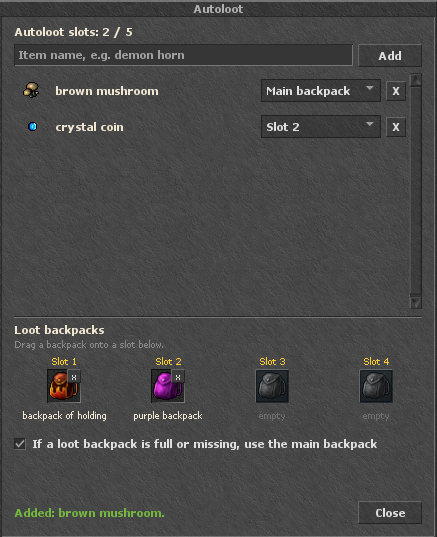
You set everything up in the Autoloot window, which you open with a button on the top bar.
❖
Item list
- Adding: right-click an item and choose „Add to autoloot”, or type its name in the field at the top of the window and click „Add”.
- Backpack choice: for each item on the list you choose where it should go: to the main backpack (Main backpack) or to one of the loot backpacks (Slot 1-4).
- Removing: click X next to the item.
❖
Loot backpacks
- You have 4 slots available for loot backpacks.
- Drag a backpack onto the slot you want in the window, or right-click the backpack and choose „Set as loot backpack”.
- The marker is saved on the backpack itself: it stays after logging out and after moving the backpack. The loot backpack must be inside your main backpack.
- The small x on the slot removes the marker from the backpack.
- Option „If a loot backpack is full or missing, use the main backpack”: when the loot backpack is full or you don't have one, the item goes to the main backpack. With it disabled, that item stays on the corpse.
❖
Slots
| Source | Slots |
|---|---|
| At the start | 3 |
| Premium account | +2 |
| Autoloot ticket (up to 5 pcs.) | +2 each |
| Maximum | 15 |
❖
Commands
You can also manage the list with in-game commands:
- !autoloot: shows your list and slot count
- !autoloot add <name>: adds an item to the list
- !autoloot remove <name>: removes an item from the list
- !autoloot clear: clears the whole list

